PCB Grounding Design and Layout Best Practices
By PCBA PrototypePublished On: 2026-04-28Categories: PCB Design0 Comments on PCB Grounding Design and Layout Best Practices
By PCBA PrototypePublished On: 2026-04-28Categories: PCB Design0 Comments on PCB Grounding Design and Layout Best Practices
1. Ground Wire
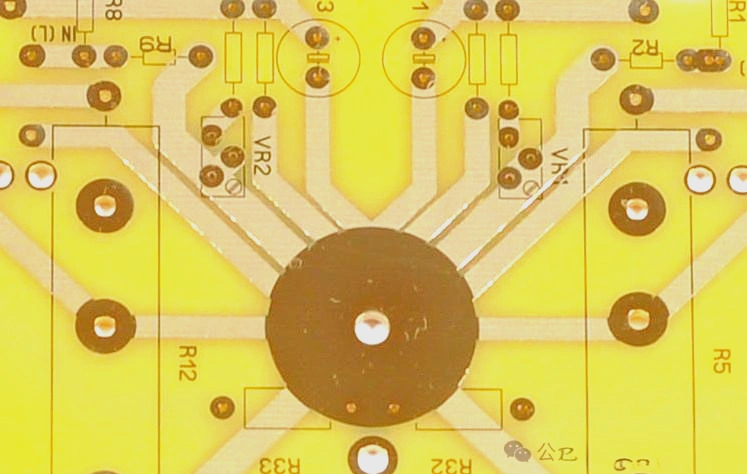
All parts that are connected to ground are linked together through one common trace. This is common in old PCB designs and in simple PCB designs.
2. Common Ground Plane
A common ground plane is one of the most common methods in PCB design. Any free space on the PCB that is not used by traces or components is covered with ground copper.
A common ground plane can greatly improve the thermal performance of the PCB. It also helps reduce electromagnetic interference (EMI).
Common Ground Plane
3. Dedicated Ground Plane
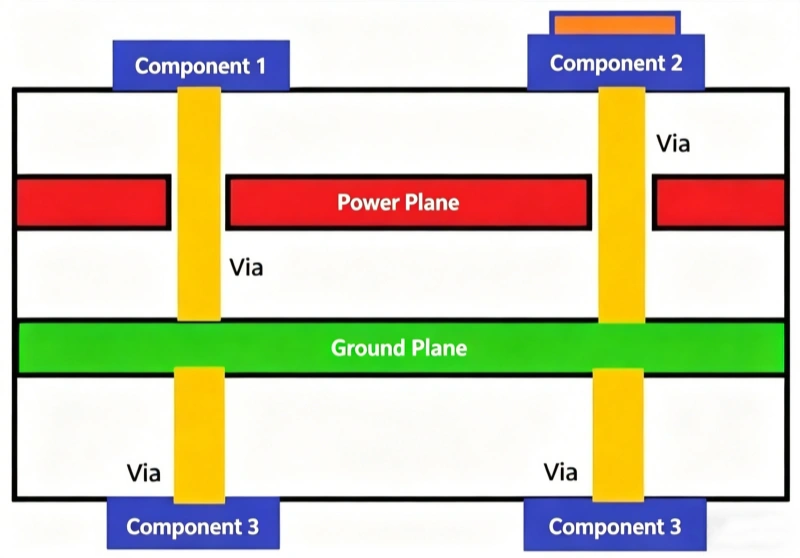
A dedicated ground plane is used in multilayer PCBs. Components are connected to the ground plane through ground vias. This kind of design can be found in dense and complex PCBs with 3 or more layers.
Dedicated Ground Plane
4. Power System Grounding
In power system installations, all grounding connections are tied to a grounding bus. This bus is connected to a grounding conductor, and this grounding conductor is connected to a grounding rod or a grounding grid.
Power System Grounding
The grounding bus brings all ground wires from all devices to one common point. The ground resistance at this point should be lower than 5 ohms to provide better grounding. Use high-grade wire to connect the grounding bus to the grounding device, such as a grounding rod or grounding grid.
5. Equipotential Grounding
Equipotential grounding means that every conductive part in the protected area should have the same ground potential. This is done by electrically connecting the equipment chassis, metal pipes, and all grounding devices.
Equipotential grounding makes sure there is no clear voltage difference between any conductive parts in the area. It also helps prevent electric shock during a fault.
Equipotential Grounding
PCB Grounding Design Tips
1. Keep All PCB Connections Complete
There should be no unconnected parts in the PCB layout. If there is an open area on your board, fill it with copper and vias to connect the ground plane. This gives all signals on the PCB a clear and structured path to ground.
2. Ground Plane
Using a ground plane is one of the most common methods used by PCB designers. A ground plane is usually made of copper and covers all areas of the PCB that do not have components or traces.
Some rules apply to ground planes, and these rules depend on the layer count of the board. For example, if the board has two layers, the rule usually is to place the ground plane on the bottom layer and place the traces and components on the top layer.
Ground Plane
When placing a ground plane, you should make sure it does not form a loop of conductive material. This loop can make the ground plane more sensitive to electromagnetic interference (EMI). When an external magnetic field touches the conductive loop, it acts like an inductor and creates current called a ground loop. A ground loop can interfere with other circuits and cause electrical noise.
A conductive loop may be formed when a ground plane is placed under the whole bottom layer and all parts that contain electrical components are removed. You should make the traces as short as possible and place a ground plane under them to prevent ringing. Also, you can avoid making a conductive loop by adjusting the layout of traces and components.
Each component must be connected on its own to a solid ground plane to avoid ground loops.
Ground loop formed by two traces connected to the ground plane
When you use chassis ground, you can avoid a ground loop by placing a gap in the grounded section that is connected to the chassis, as shown below. The use of a capacitor provides an AC grounding point. This is ideal for electrical equipment that uses wall power and needs a direct return to ground.
Remove the Ground Loop Antenna
3. Layout of Analog and Digital Components
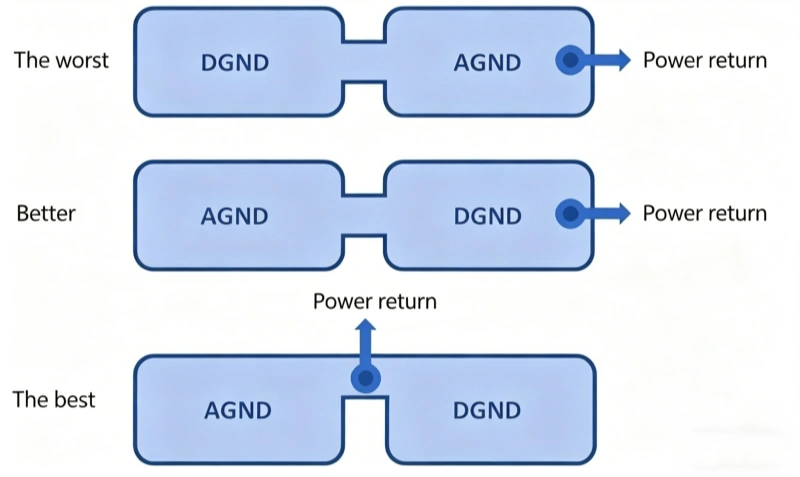
Components should be placed close to the ground signal layer so that the return path is short and the traces are well coupled to ground. If the PCB contains both analog and digital parts, you must place the ground connections very carefully. The analog part and the digital part of the board should be physically separated, but they still need to connect to the power return path.
Mixed-Signal Ground Connection
Some people may suggest fully separating digital ground and analog ground, and then connecting them with a ferrite bead. But this can create more EMI and noise problems than it solves, especially when the circuit works at very high frequency.
A good way to connect these parts is to place the power return path between the two planes so that the return current from one part does not enter the other plane. It is important to note that no traces should be routed across the gap between the two ground planes, because this creates a very long return path for current, and this is very sensitive to EMI. The space between the ground planes can be used for mixed-signal parts like ADCs.
4. Ground Plane Vias
If the PCB has ground planes on both sides, they are connected through vias placed at many different points on the board. These vias are holes that pass through the board and connect both sides together, so the ground plane can be reached from any place where a via can be placed.
Using vias can help you avoid ground loops. They connect a component directly to the ground point, and that ground point has a low-impedance connection to all other ground points in the circuit. They also help shorten the length of the return loop.
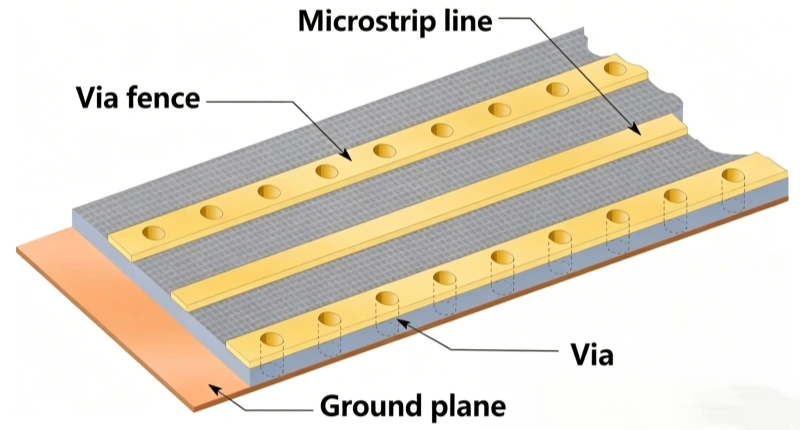
Ground Plane Vias
A ground plane often resonates at a specific wavelength of the current frequency flowing into it. You should place vias around the ground plane at fixed and accurate spacing to avoid ground plane resonance. Tented vias are an important part of a PCB because they help pull heat away through the via to the other side of the board, so they help cool down components that run hot.
If there are no vias in the PCB layout, you can drill a few small holes with a small drill machine, then run copper through the holes and solder it to make a connection between both sides.
5. Decoupling
Decoupling is the process of placing an LC network next to an integrated circuit chip to provide transient switching current. The power pins on the IC connect them to the external power supply. Also, ground pins are included to connect them to the PCB ground plane.
A decoupling capacitor should be placed between the power pin and the ground plane to remove oscillation caused by the voltage supplied to the chip.
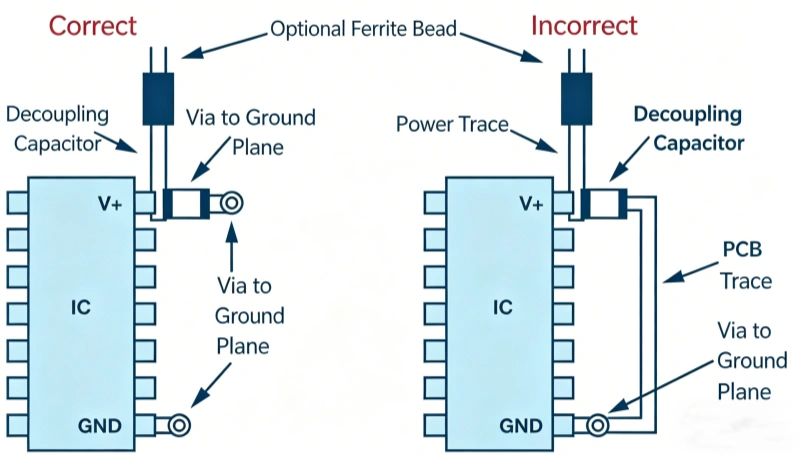
Correct and Incorrect Placement for High-Frequency Decoupling
Decoupling capacitors are very important for improving and strengthening PCB function. A capacitor is designed to store charge, so a decoupling capacitor in a PCB works as a charge storage device.
So, if the IC needs more charge, the decoupling capacitor provides charge to the IC through a low-inductance path. In addition to improving PCB function, decoupling capacitors can also reduce the noise produced by the power supply on multilayer planes. Also, decoupling capacitors reduce EMI.
6. All Connectors in the PCB Should Be Grounded
In a connector, all signal lines must run in parallel. So, you must separate the connector using ground pins.
Each board may need multiple connector pins connected to ground. Using only one pin may cause impedance mismatch problems, which can lead to oscillation. If the impedance of two connected conductors does not match, the current flowing between them may bounce back and forth. These oscillations can change system performance and cause the system to fail to work as expected.
The contact resistance of each pin in a connector is very low, but it may rise over time. So, it is better to use multiple ground pins. About 30% to 40% of the pins in a PCB connector should be ground pins.
Connectors have different pitches, and they can have different numbers of pin rows. The pins of a connector can also be parallel to the PCB surface or at a right angle to it.
7. Always Provide One Common Ground Point
No matter if it is a single-layer PCB or a multilayer PCB, there must be one point that connects all ground points together. This can be a metal frame on the chassis or a dedicated ground plane on the PCB. You will often hear this common ground point called star ground.
Always Provide One Common Ground Point
8. Reduce Series Vias as Much as Possible
Make sure to reduce the number of series vias in the ground path as much as possible. Instead, send the component ground directly to the dedicated ground plane.
The more vias added to the board, the more impedance must be handled. This is especially important for fast transient currents, because they can turn an impedance path into a voltage difference.
9. Design Ground Before Routing
Before doing any routing, always make the ground design first. This is the base of the whole routing process.
10. Know the Current Path on the PCB
Many designers only think about where their signals go, but every signal has a return path through ground. The send path and the return path of a signal will have the same current. This affects power stability and ground bounce.
You can use Kirchhoff’s Current Law to understand how current will move through your circuit.
Know the Current Path on the PCB
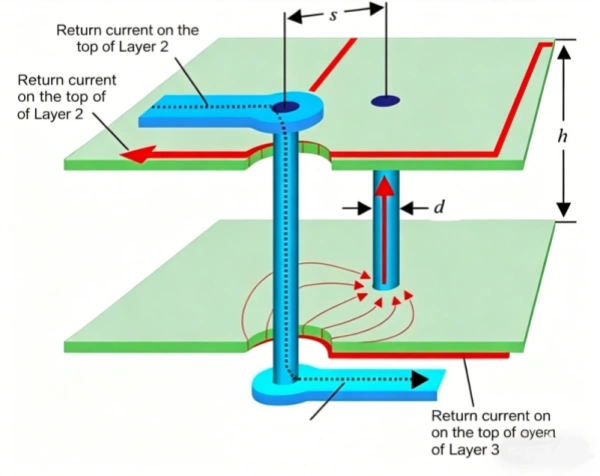
11. Ground Plane in the Stackup
In multilayer PCBs, the arrangement of power, signal, and ground layers in the stackup has a big effect on signal integrity, and it will also affect routing strategy.
It is important to keep the ground plane close to the signal layer to minimize the return path of current. In a 4-layer board, the power plane and ground plane are usually placed on the inner layers, while the signal traces and components are placed on the two outer layers.
12. Plan for Dynamic Differences Between Ground Planes
When sending ground connections between boards in a multilayer PCB, always plan for dynamic changes. This is especially important in applications that need long cables.
For these cases, you can use low-voltage differential signaling, optocouplers, and common-mode chokes to control the changes.
13. Pay Attention to Mixed-Signal Routing Separation
The analog part of the board needs to be separated, and this includes analog-to-digital converters and digital-to-analog converters.
When you design the PCB floor plan, make sure to isolate these areas. The ground of the ADC can be connected to one common ground point, and digital signals can pass through that point to the rest of the PCB.
Pay Attention to Mixed-Signal Floor Planning
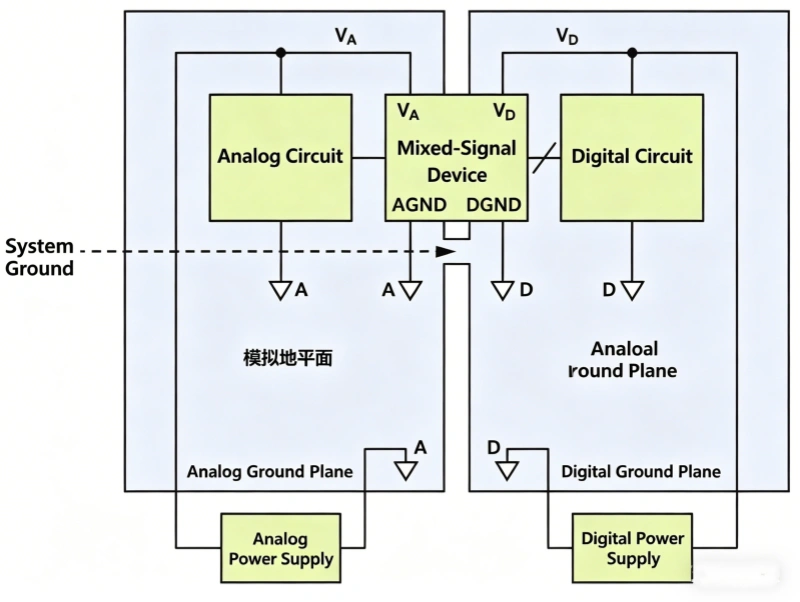
14. Avoid Ground Loops
Ground loop formed by two traces
By experience, the term “ground loop” can mean any case where a system is affected by differences in ground potential. A common example is when two modules are connected by one long cable. In that case, return current in the cable makes the ground voltage of one module much higher than the ground voltage of the other module. But here, we are talking about a ground loop in a more specific way. For example:
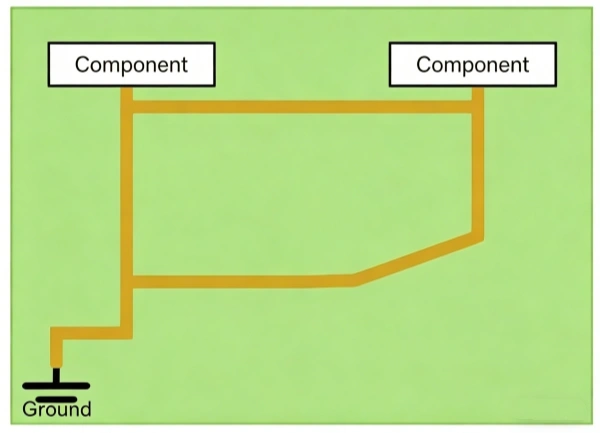
Ground Loop
If you must use separate PCB traces for many ground connections, it is very easy to create a loop like the one shown above.
The presence of a ground plane does not mean that it is impossible to create a ground loop, because CAD software will not stop you from drawing traces between ground points. But if you always use vias or through holes for ground connections, then the problem should mostly disappear. By placing a via on the plane, you can connect directly from the component to the ground point, and that point has a low-impedance connection to all other points in the ground network.
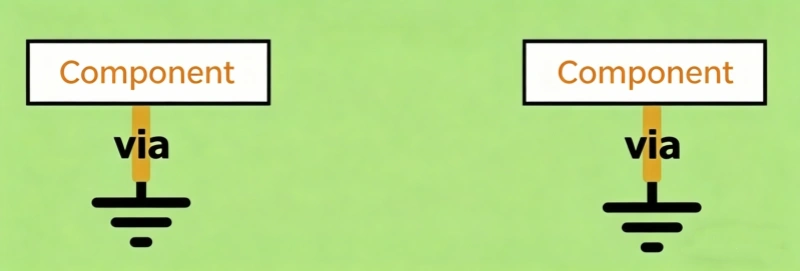
Avoid Ground Loops
It is important to place components correctly in the PCB layout. You can make the split ground plane connection directly under the component to avoid a ground loop.
Avoid Ground Loops
In PCB layouts with multiple subsystems, you can place mixed-signal components with care so that board partition connections are made under the component. This helps avoid ground loops.
For broader PCB Stack-Up guidance, see PCB Stack-Up overview.
Table of Contents
Related Posts
PCBA Prototype
October 23, 2026
PCBA Prototype
October 19, 2026