
PCB Mouse Bites: Breakaway Tab Design, Spacing and V-Cut Comparison
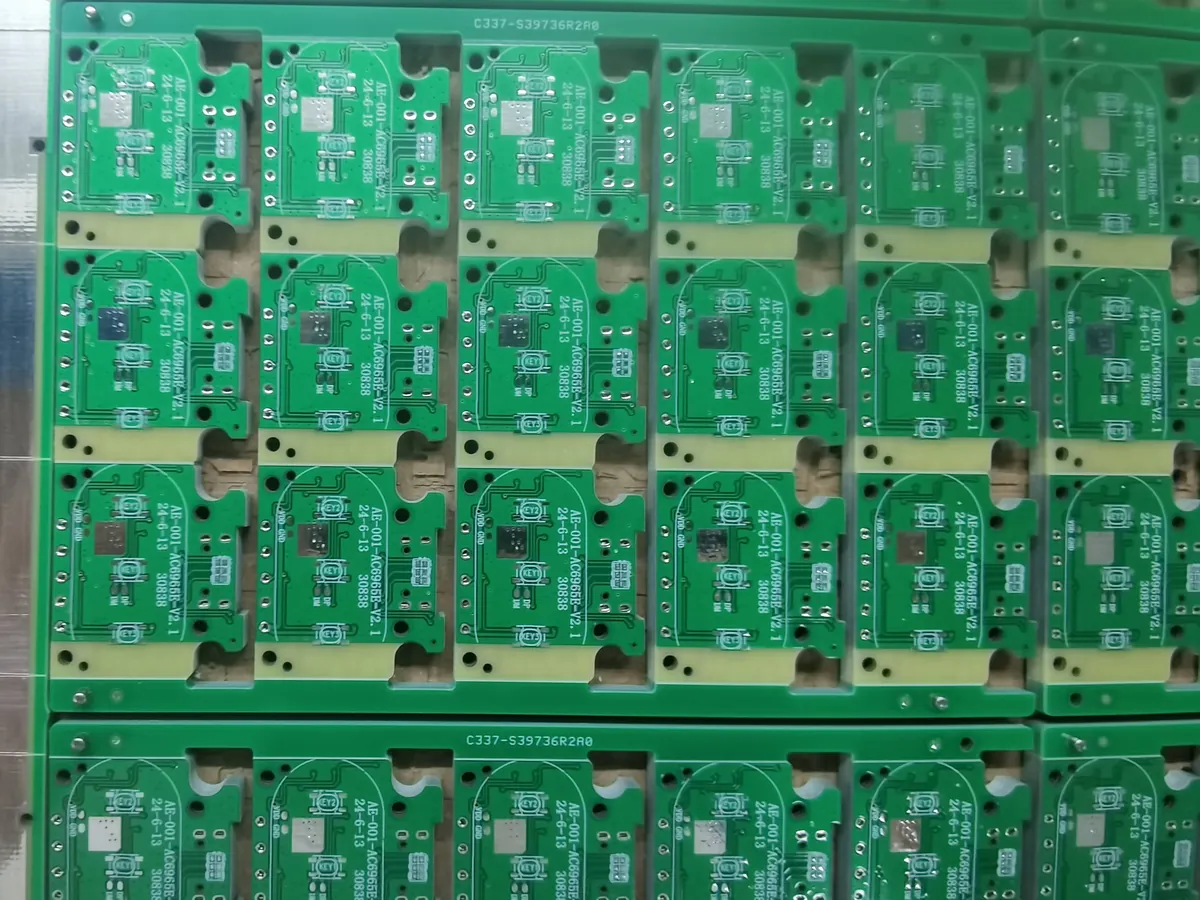
You have finished the board layout, and now your manufacturer asks how you want the boards panelized. The boards aren’t all rectangular, or a connector sits close to the edge, so a straight V-cut may not be the obvious choice. That’s where PCB mouse bites come in.
Mouse bites are small holes drilled through a breakaway tab that connects a board to a panel or rail. The surrounding board outline is routed, while the tabs keep the boards together through handling and assembly. Afterward, the tabs can be separated and the individual boards removed.
The challenge is balancing two needs: the panel must stay stable during manufacturing, and the finished boards must separate without unacceptable damage.
This guide walks through the choice between mouse bites and V-cut, then shows what to check in your panel design and production files.
What Are PCB Mouse Bites?
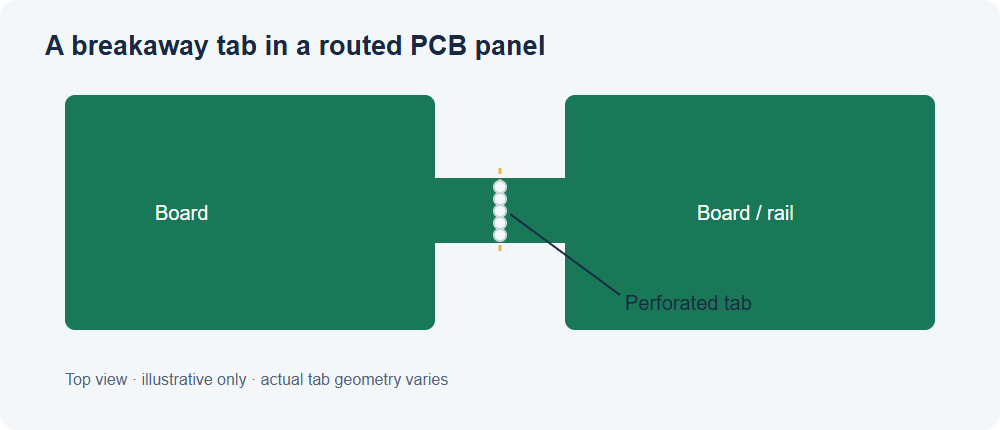
Picture two circuit boards in an assembly panel. Instead of cutting all the way around each board, the fabricator leaves a small bridge of material between them. A short row of holes crosses that bridge, creating a controlled weak area for separation.
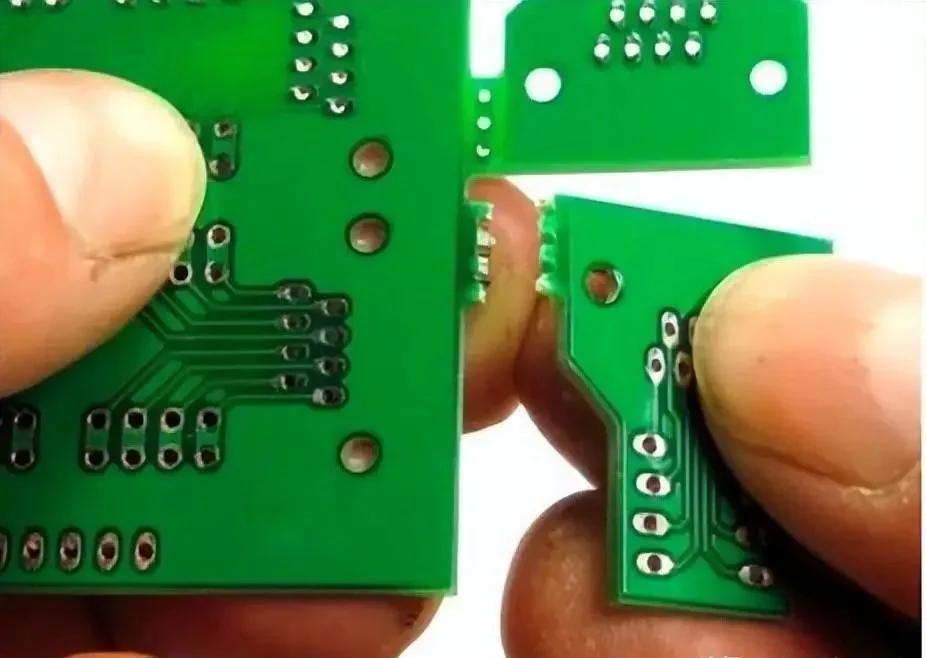
That bridge is the tab. The row of perforations is commonly called the mouse bites, although people sometimes use the term for the entire breakaway feature. The routed space around the tab defines the rest of the board outline.
These holes normally serve a mechanical purpose. They aren’t the same thing as plated through-holes used to connect copper layers or mount a through-hole component. Confirm the hole type and how the manufacturer wants it represented in the drill data.
Tabs can connect one board to another, or to a removable panel rail. After assembly, the boards are separated using the method agreed for the project.
Depending on the design and equipment, tab remnants may be broken, cut or routed. A populated board should not automatically be snapped by hand.
Mouse Bites vs. V-Cut: Which Should You Choose?
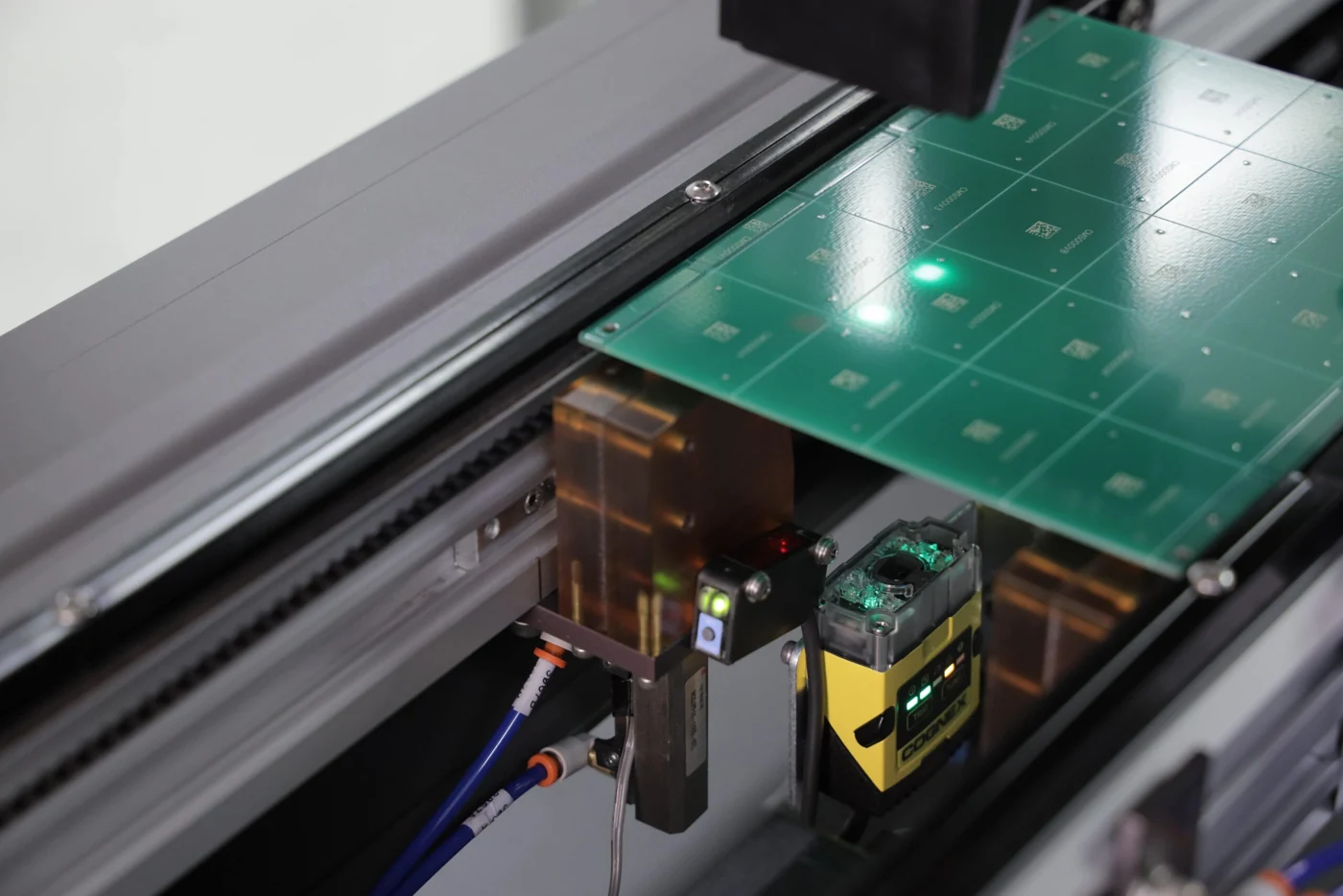
V-cut, also called V-scoring or V-grooving, removes material along a straight line, usually from both sides of the panel. A thinner section of material remains between the grooves so the panel can be separated later. Mouse bites use drilled perforations in the tabs left between routed outlines.
Here’s a useful way to compare them:
| Question | Mouse bites and routed tabs | V-cut / V-score |
|---|---|---|
| What shape is the board? | Useful for curved, irregular or otherwise routed outlines, as well as rectangular boards | Useful where the separation path can follow the fabricator’s scoring rules, typically straight lines across the panel |
| What happens to the edge? | Tabs can leave small projections or recesses that may need attention | Leaves a scored edge; final quality depends on scoring and separation |
| How much room is needed? | Routed gaps and tabs use space and need room around the outline | Adjacent boards may be placed close together where the fabrication process allows |
| How does the panel stay together? | The number, location and strength of the tabs provide support | The remaining material in the scored web provides support |
| What about assembled components? | Tab placement and the separation method must suit nearby components | Component and copper clearances must suit the score line and depaneling equipment |
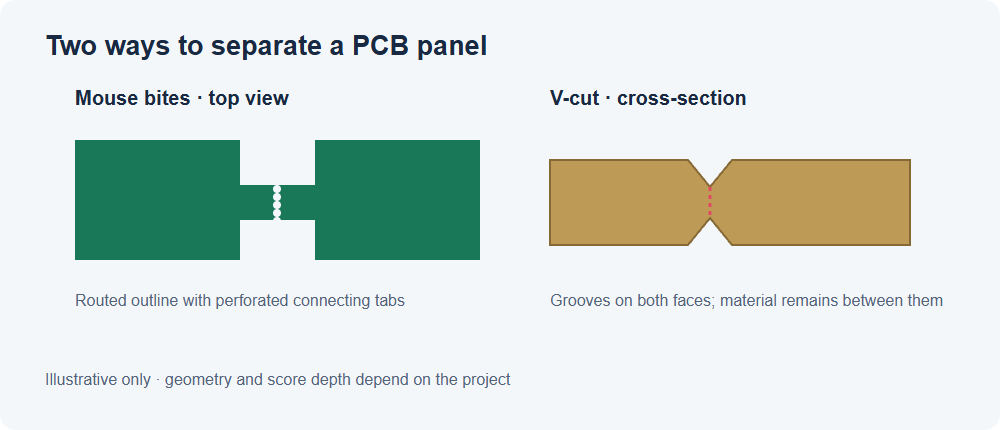
If your board is rectangular and the intended score lines can run across the panel, V-cut may be a practical place to start. If the outline curves around a connector or two boards meet in a way that a continuous score would cut through another board, routed tabs may give you more options.
That doesn’t mean every rectangular board needs V-cut, or that perforated tabs are the only way to separate an irregular board. A panel can also combine methods where the manufacturer supports the layout. The useful question is: can this particular panel be manufactured, assembled and separated without damaging the board or its components?
For the types of arrangements shown on our site, see Panel Requirements for Assembly. Confirm the current details with the manufacturer for your project.
How Do You Design Mouse Bites?
Before choosing a hole size, look at the whole panel. A useful starting sequence is:
- Place the tabs: support the board and leave room for separation.
- Define the holes: distinguish hole diameter, center pitch and the material between holes.
- Check the finished edge: review copper, components and the expected edge profile.
Each decision affects panel stability and the finished board, so review them together.
Place Tabs Where the Board Can Be Supported
Look at the whole panel, not just one tab. A small board with a heavy edge connector may need more support than a lightweight, symmetrical board.
Also consider the rails, board thickness, reflow handling and how the boards will be separated.
Check tab positions carefully around:
- Edge connectors and plated half-holes
- Mounting features and enclosure contact areas
- Fragile components or parts close to the board edge
A tab that fits in CAD may leave a protrusion exactly where the finished board has to fit into an enclosure. Review these locations before releasing the design.
Where the board outline limits your choices, discuss the support and the eventual separation method with the manufacturer before finalizing the panel. More tabs may improve support, but they also create more places to separate and inspect.
Distinguish Hole Diameter, Pitch and Edge Spacing
Manufacturing notes often use the word “spacing” without saying exactly where it is measured. Two measurements are easy to confuse:
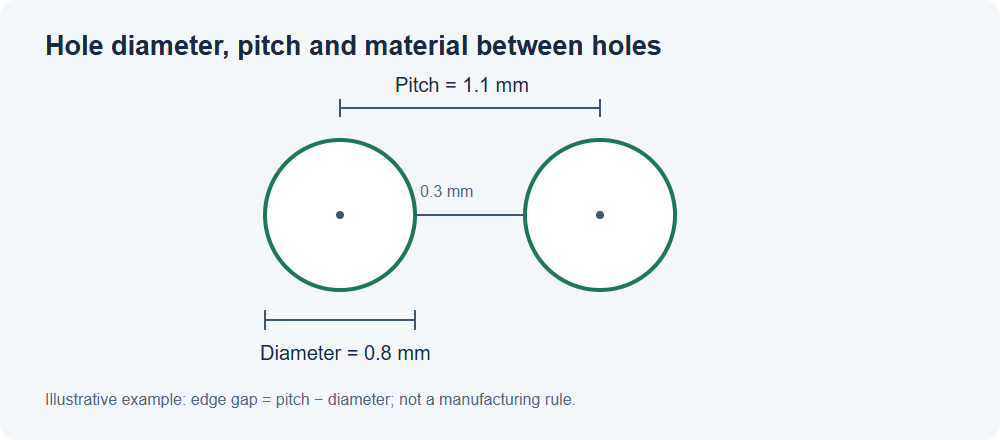
- Center-to-center pitch: the distance from the center of one hole to the center of the next.
- Edge-to-edge spacing: the remaining material between the walls of two adjacent holes.
For equal-sized round holes, the relationship is:
Edge-to-edge spacing = center-to-center pitch − hole diameter
For example, suppose a drawing calls for 0.8 mm holes on a 1.1 mm pitch. The nominal material between adjacent hole edges is 1.1 − 0.8 = 0.3 mm. This is an illustrative calculation based on values in a Chinese design article, not a universal manufacturing specification. Actual drilled sizes, tolerances, board material and the manufacturer’s rules still need to be considered.
GreatPCB’s published panel guidance: For tab routes with breaking holes, our panel requirements for assembly list a minimum hole diameter of 0.45 mm, a regular diameter of 0.55–0.60 mm, and a minimum hole spacing of 0.35 mm. The page also describes a usual arrangement of 5–6 holes per tab.
The published guidance does not specify whether the 0.35 mm spacing is measured center to center or edge to edge. Confirm the measurement definition and the requirements for your board, tab and panel with our engineering team before finalizing the files.
Check the Holes Against the Finished Board Edge
Compare the hole row with the finished board outline. Its position affects the edge left after separation:
- Farther into the tab: more material may remain outside the board.
- Extending into the board outline: the edge shape changes and some finished-board material is removed.
Neither position is automatically correct for every board. Consider the acceptable edge profile, routed outline, copper clearance, nearby features and the manufacturer’s cutting process together. Altium’s discussion of mouse bites and V-scores shows why both hole placement and the intended routing path belong on the fabrication drawing.
Before release, zoom in on every tab location and ask: after separation, what material remains, and where is the nearest copper or component? That simple check catches problems that can be hard to see when you’re looking at the full panel.
Common Problems—and What to Check First
The Panel Flexes or a Board Comes Loose Too Early
If a board is only held by a small number of weak or poorly positioned tabs, it can move during handling or assembly. But adding holes, widening a tab or changing the number of connections can affect both support and the force needed to separate it.
Start by identifying where the panel is supported and where heavier components sit. Then review tab placement and the proposed depaneling method with the manufacturer. For thin boards or unusual outlines, a sample panel may be useful before committing to a larger run.
The Finished Edge Is Too Rough
Perforated tabs can leave a visible edge pattern or small remnants. That may be acceptable for a board hidden inside a housing, but not for a front panel or a board that slides into a closely fitted slot. This exact trade-off came up in a Reddit discussion about smoothing mouse-bite edges.
Rather than wait until the boards arrive, specify the edge requirement on the drawing. Ask whether the tab position, routing, secondary finishing or a different panel arrangement can achieve it. If post-processing is needed, use a suitable controlled process for board material and dust handling.
Copper or Components Are Too Close to the Break Line
A tab is a place where the panel is deliberately weakened and later separated. Copper, vias, pads, ceramic components and connectors near that area deserve a closer look. So do tall parts that may interfere with a depaneling tool.
There isn’t one clearance number that solves every case. Identify the planned tool and separation direction, then agree the necessary copper and component keepouts with the manufacturer. A design that passes an electrical check can still be vulnerable to mechanical damage at the board edge.
A V-Cut Would Cross Another Board
Imagine a panel containing three boards arranged in a T shape. A score line that separates two of them may continue into the third board. In a KiCad forum discussion, designers raised this exact question when arranging several different designs on one panel.
The answer depends on the fabricator’s equipment and panel rules. Where the score must run continuously, discuss these options:
- Rearrange the boards so the score line has a clear path.
- Use routed tabs at the affected separation.
- Send separate board files and ask the manufacturer to propose a panel.
What Should You Send to the Manufacturer?
First, decide who is responsible for the panel design. You might send a single-board design and let the manufacturer propose a panel, or you might provide a completed panel drawing and production data. Either approach can work, but it helps to say which one you expect.
Include:
- The finished board outline and revision, including any critical edge features or enclosure fit requirements.
- Your intended panel arrangement, if you have one: board count, orientation, spacing, rails and whether different designs share a panel.
- Separation details: identify score lines, routed paths, tab locations and perforation holes in the agreed drawing and data layers.
- Drill information: identify hole sizes and which holes are plated or non-plated where applicable; make sure coordinates and units match the panel drawing.
- Assembly and depaneling requirements: component overhang, edge-sensitive parts, desired delivery as individual boards or panels, and any edge-quality requirement.
If assembly equipment needs panel-level alignment features, coordinate their locations with the panel design. Our PCB fiducial marks guide explains the role of those marks. The exact file layer or naming convention for V-score lines and routing should be agreed with the manufacturer; different CAD workflows and fabricators handle them differently.
Before ordering a stencil or fixture, check which approved board or panel revision it must match. If the panel is changed after release, the original coordinates may no longer describe the production layout.
Frequently Asked Questions
Can a V-cut stop halfway across a panel?
Often, no: conventional scoring equipment commonly needs a straight line that runs across the panel. Capabilities vary, so show the proposed layout to the fabricator. A routed section or a different arrangement may be more suitable where a continuous score would cross another board.
Can I use mouse bites and V-cuts on the same panel?
Yes, a hybrid panel can be possible. For example, straight sections may use scoring while another part of the outline uses routed tabs. Check that the manufacturer supports the combination and that the panel remains stable through assembly and separation.
Should mouse-bite holes extend into the board?
They can be positioned in different ways, depending on the desired finished edge and fabrication rules. Moving the holes into the outline may reduce the projection outside the board, but it also removes material from the board edge and can affect nearby copper. Review the actual outline and clearances before deciding.
How many holes or tabs do I need?
There is no universal count. It depends on tab geometry, panel size, board thickness, component weight, handling and the planned depaneling method. Use the manufacturer’s design guidance for an initial layout, then ask for a review when the panel is unusually thin, heavy or irregular.
Can I send separate boards instead of a finished panel?
Many manufacturers can review separate board files and propose an arrangement. Tell them the quantity, board orientation, assembly requirements and any edge constraints, then approve the resulting panel details before production.
If you’re preparing a project for PCB assembly, bring up the panel and depaneling requirements when you send the design files. It’s much easier to adjust a tab on a drawing than to discover after assembly that a connector or enclosure needs the space it occupies.
Tags
Related Posts
PCBA Prototype
October 23, 2026
PCBA Prototype
October 19, 2026